
Native macOS 14+ • Read-Only Sector Scanning

SDRecover

Recover lost photos, RAW shots & videos from memory cards.

The clean, native Mac app designed to restore files from SD cards, USB flash drives, and removable storage. Featuring Named Undelete for FAT/exFAT, file carving for camera RAWs and documents, and native macOS Quick Look previews before recovering.

macOS 14+ Sonoma & Sequoia Apple Silicon & Intel Universal 20 Files Free Demo Unlimited Quick Look Previews
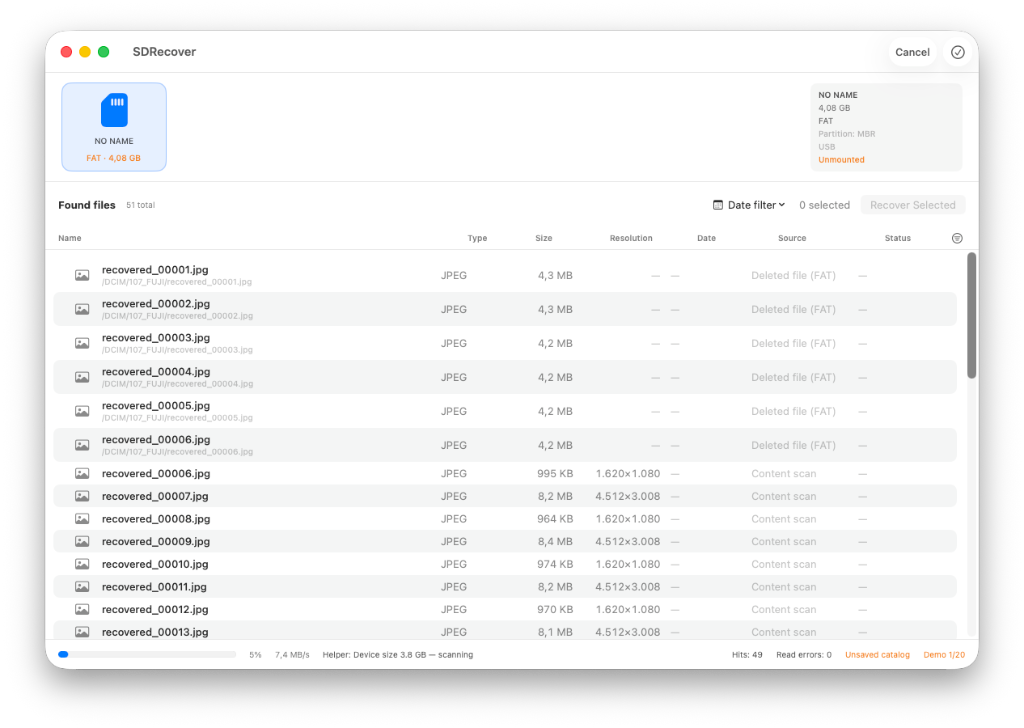
SDRecover scan results showing volume strip, found files list, resolutions, and progress
Recovery Workflow

Recover your data in 5 clear steps

No terminal commands, no complex arguments. SDRecover guides you through a secure, read-only process designed to protect your storage.

1

Choose Volume

SDRecover automatically detects connected external storage cards and displays them in the volume bar. (Internal drives can be enabled optionally).

2

Set Filters

Target file types (photos, camera RAWs, video, documents) and set minimum size thresholds (e.g. min. 800×600 px) to skip tiny thumbnails automatically.

3

Read-Only Scan

The privileged helper temporarily unmounts the volume and reads raw device blocks (/dev/rdisk*). Found files stream live into the results list.

4

Free Quick Look Preview

Press Space for native macOS Quick Look previews (up to ~80 MiB). Inspect full photos and documents prior to recovery — previewing is completely free and exempt from demo limits.

5

Select Target & Recover

Pick any destination folder on your Mac and extract selected files. When quitting the app, previously unmounted cards are automatically remounted in Finder.

Key Capabilities

Precision & Safety for Your Memories

Combining classic filesystem directory recovery with modern file carving for highest recovery rates.

Named Undelete: Preserves Original Filenames

When files are deleted on FAT16, FAT32, or exFAT cards, SDRecover reconstructs original filenames and directory paths (such as /DCIM/100CANON/IMG_0123.CR2) whenever directory records survive, avoiding chaotic piles of generic filenames.

Explore filesystem details in support docs →

File Carving

Even when cards are formatted or directory records are damaged: file carving identifies and reconstructs files from known file signatures (header/footer structures) directly in the raw data — without relying on the filesystem.

View supported file types →

Targeted Scan Filters

Zero in on what matters: Filter by JPEG, HEIC, AVIF, camera RAWs (CR2, NEF, ARW, ORF), video, or documents. Skip tiny thumbnails under 8 KiB or resolutions below 800×600 automatically.

Scan settings in SDRecover with file types filter

Quality Pass, EXIF Data & Integrity Badges

Following the scan, SDRecover extracts EXIF capture dates, image dimensions, and camera orientation. Native macOS ImageIO and PDFKit engines evaluate each file's integrity — letting you verify at a glance whether a photo is complete or damaged.

Save your scan session as a catalog file (.sdcat) and resume anytime without re-scanning the card for hours.

Integrity & Quick Look details →
Fair & Transparent

Verify First, Unlock Later

Verify your recoverable files for free before purchasing — no subscription, no recurring charges, no surprises.

One-Time Purchase · No Subscription

SDRecover Pro

Perpetual license for unlimited file recoveries from SD cards, USB drives, and removable storage on your Mac.

  • 20 files recovered free: Test full file extraction before purchasing a license.
  • Unlimited previews for all files: Full Quick Look inspection before buying.
  • Unlimited recovery: No file count limits, no data volume caps.
  • All file formats: Camera RAWs, 4K/HD video, documents, audio, and archives.
  • Safe read-only design: Source media is protected and automatically remounted upon exit.
9.99
One-time payment incl. VAT Buy Pro Now
Secure checkout via Lemon Squeezy

Instant license delivery by email upon completing checkout.